
This is an old revision of the document!
Netscaler NS12.0 (Build 57.153.nc) in NSMPX-15000-50G
Port configuration (front and back panel): External Link. : 4x40GE QSFP+ and 8x10GE SFP+ ports.
- Cluster commands:
- sh cluster instance 1
- sh cluster node 0-1
- MY NOTES on ns10 : External Link
- MPX,SDX,VPX: External Link
jargon:
- LON
- MPX: Purely bare metal, 14040-S
- SDX: hardware hosting xen server
- VPX: virtual ns. Hosted in
- MAS vs Cluster coordinator
- NSIP: to administer the box
- SNIP: towards the backend servers. Type 'Subnet IP'
- USNIP enabled. That's what tells it to use the SNIP as the source IP.
- USIP Fo your web servers need to see the real client IP. You'd also need to change the web server's default gateway to the SNIP.
Interface status:
show interface
sh interface -summary          # to quickly see mac addressses.
show channel # for lacp
show vlan # to see vlans and interfaces assigned to them

cli command to check power supply. rem that linux command suite for hardware status..
Installation
Uplink SFP+ (optic transceivers) Backend SFP+ (optic transceivers)
NETSCALER TROUBLESHOOTING:
Check this link: http://dknetscaler.blogspot.com/
sh ns connectiontable
stat serviceGroup Asci_Cluster | more
stat lb vserver Asci_Cluster_SSL
disable interface <interface_num>  # to disable an interfaces (enable for the opposite)
NINJA TOOLS HERE, LOG SEARCH FEAT.: https://www.slideshare.net/davidmcg/indepth-troubleshooting-on-netscaler-using-command-line-tools
LOG ANALYSIS
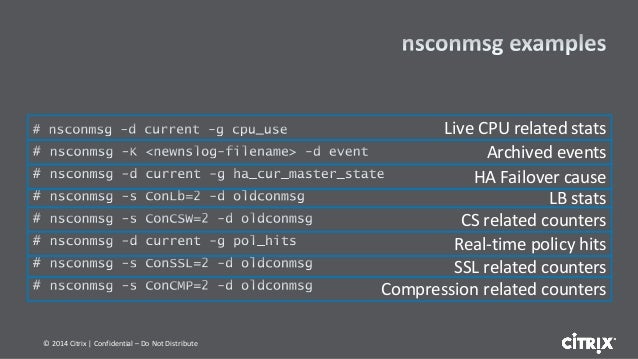
nsconmsg cheat sheet
nsconmsg -K newnslog.99 -d event -d current | grep high_cpu
nsconmsg -K /var/nslog/newnslog.73.tar.gz
Reads /var/nslog/newnslog formatted log files and displays the data
"-d <operation> - display performance data"
- setime start and end time of data file
- stats Display current statistic counters
- statswt0 Display non-zero statistic counters
- current Display current performance data
- event Display event details
- consmsg Display console message
same command to view archived logs. For instance if you have a newnslog.100 file.
cd /var/nslog
tar xvfz newnslog.100.tar.gz
/netscaler/nsconmsg -K /var/nslog/newnslog
We can also use nsconmsg for real time statistics:
nsconmsg -d current -g cpu_use
nsconmsg -d current -g ha_cur_master_state
Create and upload tech support bundle files from the netscalers
GENERATE
show techsupport # for individual node tech support
show techsupport -scope CLUSTER # from the cluster vip , for cluster related tech supprt
UPLOAD (from the device itself). This is just an example. Citrix credentials are required
/var/tmp/support perl cis_upload.pl [-sr <service request number>] [-description <description>] <collector file or trace file or any other file>
On the Netscaler load balancer, to generate a tech support bundle you can use:
show techsupport -scope CLUSTER
If you already have a case open, then you can upload it directly to the case using
show techsupport -scope cluSTER -casenumber ### -upload -userName colinkeith -password XXX
If you have generated an existing file you can add the filename with the additional option:
file /var/tmp/support/support.tgz
NETSCALER CRASHING
If the device crashed, we should have recent information (dump file)
/var/core
UPGRADE NETSCALER:
Cluster mode
- Double check current configuration is stored in rancid
- Check synchronization is OK
- Save configurations
- Access each node through its NetScaler IP (NSIP)
cd /var/nsinstall
mkdir x_xnsinstall
cd x_xnsinstall
tar -zxvf ns-x.0-xx.x-doc.tgz
./installns

* After the uprade, restart the node.
* Check all is OK (passing traffic) and move to the next (configuration) one
Ref: https://docs.citrix.com/en-us/netscaler/10-5/ns-system-wrapper-10-con/ns-cluster-home-con/ns-cluster-sw-updowngrade-tsk.html
HA mode:
For HA: https://support.citrix.com/article/CTX127455
SECURITY::
Layer 7 DDoS features - https://support.citrix.com/article/CTX131681#4
SYN COOKIES: https://docs.citrix.com/en-us/netscaler/11/security/ns-httpdosp-wrapper-con-10/ns-syn-dos-protection-con.html?_ga=2.64581611.554544567.1523534518-212221746.1522186237
….A NetScaler appliance defends against SYN flood attacks by using SYN cookies instead of maintaining half-open connections on the system memory stack….
So “here you have a cookie with my syn-ack while you send me the final ACK. I am not allocating any memory or wait for that ack”
AUTOMATION
Local crontab:
root@netscaler01-mgt# tail -2  /etc/crontab
*/5     *       *       *       *       root    /netscaler/nscli -U 127.0.0.1:nsroot:xei1reiD "enable interface 1/10/3;enable interface 1/10/4;enable interface 1/10/7;enable interface 1/10/8;enable interface 1/LA/2;enable interface"


