
This is an old revision of the document!
Asymmetric Key encryption:
- Kpriv
- Kpub
OPENSSL/CERTIFICATES
See crypto summary here:HERE
To check the TYPE of certificate we have:
openssl x509 -in jaime-cert.cer -inform [der/pem] -noout -text
To READ the contents of a certificate:
openssl x509 -in /nsconfig/ssl/mycompany1.co.uk.pem -text
To verify that the Kpriv used to generate the certificate is the correct one (we compare cert key (mod) and key (mod)). See External Link
openssl rsa -noout -modulus -in device-private.key | openssl md5
openssl x509 -noout -modulus -in intermediate-root-chain.crt | openssl md5
A RSA key can be used both for encryption and for signing: GENERATE private key:
openssl genrsa -out private_key.pem 4096
Extract public key from the private one:
openssl rsa -pubout -in private_key.pem -out public_key.pem
Create CA certificate
openssl req -config openssl.srx.cnf -new -x509 -extensions v3_ca -keyout private/ca.key -out certs/ca.crt -days 1500
Sign a certificate (in the CA):
openssl x509 -req -days 3650 -sha1 -CA certs/ca.crt -CAkey private/ca.key -CAserial serial -CAcreateserial -in srx-j24-id.req -out certs/srx-j24.crt -extfile ext.cfg
To convert from the b64 notation to text notation so we can see each of the parts of the key/certificate:
openssl pkey -in privkey -in privkey-A.pem -text
Same but for a certificare in crt format:
openssl x509 -in certificate.crt -text -noout
Generate CSR (Certificate signing request)
- STEP 1. If not already present, generate a key file:
openssl genrsa -des3 -out rttpd.new.key 1024
- STEP 2. Generate the CSR file that will be submitted to a certificate authority like Verisign/GoDaddy. You will need to know all of the information to fill the answers.
openssl req -new -key rttpd.new.key -out rttpd.csr
- STEP 3. View The Contents Of A Certificate Signing Request
openssl req -text -noout -in rttpd.csr
- STEP 4 : Send certificate to CA to be signed or self sign it (in linux with:
openssl x509 -req -days 3650 -sha1 -CA certs/ca.crt -CAkey private/ca.key -CAserial serial -CAcreateserial -in srx-j24-id.req -out certs/srx-j24.crt -extfile ext.cfg
In NETSCALER:
- Citrix NetScaler VPX: Create CSR and Install SSL Certificate. Link1
- Install Your PKI certificate Link2
In F5 BIG-IP:
To REQUEST the key that signed a package..
gpg --keyserver x-hkp://pool.sks-keyservers.net --recv-keys 0x416F061063FEE659
And this is to VERIFY a signed package:
gpg --verify ./tor-browser-linux64-4.0.1_en-US.tar.xz{.asc*,}
To CREATE CA and private key:
openssl req -config openssl.srx.cnf -new -x509 -extensions v3_ca -keyout private/ca.key -out certs/ca.crt -days 1500
(I am the CA). To sign a certificate: openssl x509 -req -days 3650 -sha1 -CA certs/ca.crt -CAkey private/ca.key -CAserial serial -CAcreateserial -in srx-j24-id.req -out certs/srx-j24.crt -extfile ext.cfg
About formats and extensions
- .asc is a signature file
- .csr This is a Certificate Signing Request.
- .cer files for certificates only.
- .pem Defined in RFC's 1421 through 1424, this is a container format (just the public certificate or may include an entire certificate chain including public key, private key, and root certificates (Privacy Enhanced Email, a failed method for secure email)
- .key This is a PEM formatted file containing just the private-key
- .pkcs12 .pfx .p12 Originally defined by RSA. This is a passworded container format that contains both public and private certificate pairs. Unlike .pem files, this container is fully encrypted. Openssl can turn this into a .pem file with both public and private keys: openssl pkcs12 -in file-to-convert.p12 -out converted-file.pem -nodes
About Certificate Fields
- CDP: Here it indicates how to get hold of the CRL for that certificate
Certificate request is made by PKCS10 https://tools.ietf.org/html/rfc2986
TLS CIPHERSUITE COMPONENTS:
https://docs.microsoft.com/en-us/windows/win32/secauthn/cipher-suites-in-schannel
- Key Exchange Algorithm RSA, DH, ECDH
- Authentication Algorithm RSA, DSA and ECDSA.
- Encryption Algorithm AES, 3DES
- Hashing
To see what ciphersuite a site uses, just FF cert details, then go here and check the ciphersuite details: https://ciphersuite.info
CERTIFICATE CHAIN / WILDCARD CERTIFICATES:
CRYPTOGRAPHY NOTES
- AES in ECB mode , Old and quite bad end to end encryption. It keeps the pattern.
- Ciphersuite names breakdown. Link Example: (TLS1.2)-(RSA)-(AES-128-CBC)-(SHA1
- key exchange algorithms : TLS1.2
- bulk encryption algorithm : AES-128-CBC
- MAC algorithm : SHA1
Then we have Authenticated Encryption (AE) : form of encryption which simultaneously assure the confidentiality and authenticity of data. External_Link . It uses encryption context that represents additional authenticated data (AAD)
TODO: Does replace or complement the certificate-based authentication?
HTTPS > TLS1.2-3 > RSA KEY EXCHANGE
RSA Key Exchange:

Very succinct and clear HERE!
Components:
- m: Your original message (converted to a number)
- e: Public encryption exponent (usually 65537, which is 2^16 + 1)
- d: Private decryption key (kept secret)
- n: The modulus (also public)
encrypted = (message ^ e) mod n
decrypted = (encrypted ^ d) mod n
There's a mathematical relationship between e, d, and n that makes RSA work. If someone could factor n into p and q, they could calculate d using a formula that connects them all. To calculate d, you need to know: e (which is public) (p-1) and (q-1)
- (p, q, and λ(n) were used to compute it so keep them hidden!).
- Modulus n = p*q
- Now that we have Carmichael’s totient of our prime numbers, it’s time to figure out our public key. Public keys 'e' is ade up of a prime number e, as well as n. ,Because the public key is shared openly, it’s not so important for e to be a random number. In practice, e is generally set at 65,537 ! in practice e is nearly always the same number
- now we can encrypt the data: c = m^e mod n . m:message
- to decrypt: Private keys are comprised of d and n. We already know n, and the following equation is used to find d: d =1/e mod λ(n)
- m = c^d mod n
- TODO server gets ‘d’ secretly
- Public key is : ‘e’ and the ‘m’ (module)
RSA Key Exchange:
TODO
TLS1.2 The TLS protocol comprises two layers: the TLS record and the TLS handshake protocols.
- Handshake
- Asymmetric cipher
- Asymmetric cipher
- cipher settings + session-specific shared key
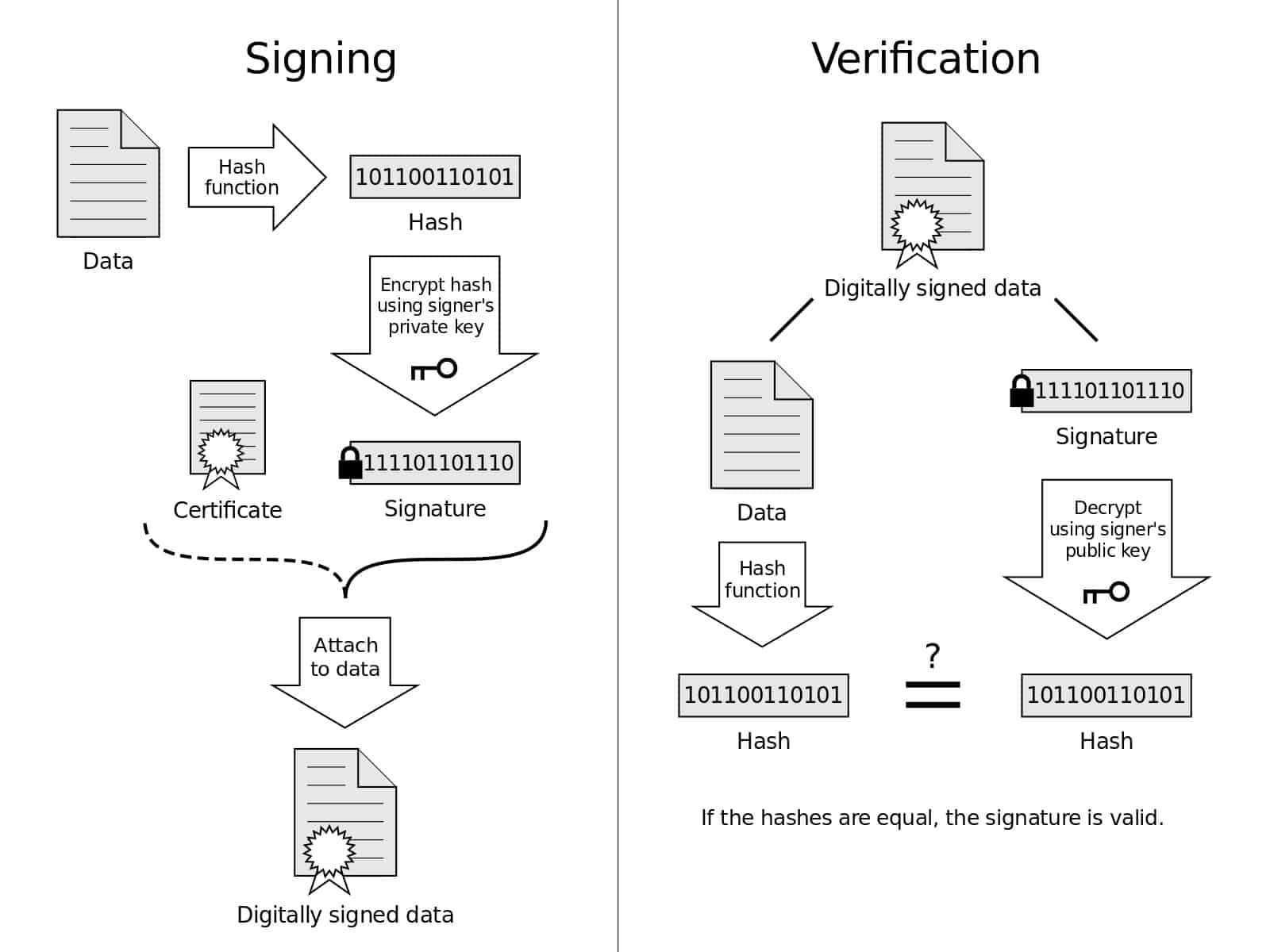
- Server identifies itself via a digital certificate (server name , CA and server's public encryption key (e and mod)). Note that, in the authentication check,the client uses the public key to decrypt the hash-of-the-certificate and then compares the result with the certificate itself External Link. Fingerprint is a digest (hash function) of a certificate in x509 binary format.
- The client now:
- encrypts a random number with the server's PK and sends the result to the server ; both parties then use the random number to generate a unique SESSkey for subsequent encryption and decryption of data during the session
- OR uses Diffie-Hellman to create a SESSKeykey with the additional PFS
WEB CERTIFICATES NOTES ( Transport Layer Security (TLS) certificates )
- Link explaining
- Issuers signs (SK)
- TLS certificates parts, from the Mozilla website.
- Public Key Info (Algo, Size, Exponent, Modulus)
- Signature Algorithm : This is the algo used to sign the certificate.
- A signature is made by: 1) calculating the certificate digest (~hash) and 2) then encrypting it with its (CA's) private key
- Fingerprints : It's the digest used to generate the signature (step 1 above)
How to force apache to use certain TLS
# Be sure this is all the below SSLProtocol TLSv1.2
/etc/apache2/mods-available/ssl.conf
/etc/apache2/mods-enabled/ssl.conf
/etc/letsencrypt/options-ssl-apache.conf
apachectl restart
TODO 1:
-
- to calculate b exp e mod m , is not feasible to do b^e and then mod m cos b and e are quite big. however we can factor the 'exponented' number and use this property : (a*b)modm=[(a(modm)*(b(modm)]modm.
- Check above the much more efficient algorithm . AND ALSO, review the finite cyclic groups
- co-prime
- PFS ( Perfect Forward Secrecy ): Ensures that any future disclosure of encryption keys cannot be used to decrypt any TLS communications recorded in the past.
SSH NOTES
Give this a read External Link
- 1st session key agreement , KEX algorithms ( PKC to seup the symmetric encryption)
- debug2: KEX algorithms
- debug2: ciphers stoc
- 2nd Integrity MACs ctos: / MACs ctos: chosen integrity message authentication code. All msgs after this have an hmac attached
- kex: server→client cipher: AGREED CIPHER (BASED ON SYMMETRIC KEY) ; kex: client→server cipher: AGREED CIPHER (BASED ON SYMMETRIC KEY)
- 3rd client authentication hostkeyalgs ( PKC to authenticate (key based authentication))
- Server uses private key to send a Challenge
- kex: algorithm: <AGREED ALGORITHM FOR THE PK BASED AUTHENTICATION
NOTE: stoc (server to client) ctos (client to server)
For authentication
nmap –script ssh-hostkey 10.99.16.231-254  # to see the PubK lenght (remote)
ssh-keygen -l -f ~/.ssh/id_rsa.pub  # to see the key lenght (local)
For encryption (cryptos)
nmap --script ssh2-enum-algos 192.168.0.250 -p22 # to sjow all the above algorithms
CERTIFICATE BASED SSH
To have it started on login and the keys loaded, add this to .bashrc:
- then add this at the end of .bashrc : ssh-add ~/.ssh/* > /dev/null 2>&1
http://askubuntu.com/questions/54670/passwordless-ssh-not-working
This method works for ssh from root A to root B. To be checked how to ssh with certificate to from usera@A to userB@B. I think A user needs to exist as user in B host
To use a specific public key:
ssh -i .ssh/id_rsa.pub
Or to load a set of private keys (in different files) and use the corresponding one every time we ssh, we can make use of ssh-agent utility:
ssh-keygen # generate my key pair Protected By Password (full path is needed)
!
eval ssh-agent /bin/bash  # starts ssh agent. eval allows to load the env variables in the shell
ssh-add ~/.ssh/* # adds the keys
ssh-add -l   # lists the keys currently loaded
# ssh-copy-id <remote-host>    # copies the pub key in the remote 'authorized_keys' and takes cares of the permissions
kill $SSH_AGENT_PID
'ssh-agent' and 'ssh-add' can be automated with this in ~/.bash_profile:
if [-z "$SSH_AUTH_SOCK" ]; then
     eval `ssh-agent -s`
     ssh-add ~/.ssh/*
For ubuntu/raspbian based systems we use this solution : https://sourceware.org/legacy-ml/cygwin/2001-06/msg00537.html
If we want to see the private key
If we want to use a different (generally lower) key algorithm:
For issues with the virtual manager keys:
We need virtual manager to use the id_rsa_gk first. Temporarily, we can remove the other keys from the agent with:
ssh-add -d  /home/jaime/.ssh/bitbucket_rsa
ssh-add -d  /home/jaime/.ssh/id_rsa
ssh-add -d /home/jaime/.ssh/id_rsa_git
# we keep this one: /home/jaime/.ssh/id_rsa_gk
TROUBLESHOOT:
- Normally only the 5 first keys are accepted by servers, try to keep the keys below that number
- if ssh-add has problems to add keys it might be problem with the key format (Openssh vs PEM). Try the command below:
ssh-keygen -p -m PEM -f bitbucket_rsa
ADD NEW CA (EG WEBSENSE) TO LINUX BOX
(From: Link
Check the certificate is in pem mode (see this Link:
openssl x509 -in websense.corporate.local.crt -text -noout
This is to convert certificate formats (eg: crt/der binary to pem ) : Link & Link
Copy ca certificate to ssl linux directory and add it to the trusted list:
cp websense.corporate.local.crt /etc/pki/ca-trust/source/anchors/
update-ca-trust enable
update-ca-trust
CRYPTOGRAPHY IN MS WINDOWS ENVIRONMENTS
[…]
- SCEP facilitates the certificate enrollment and renewal of certificates.
- SCEP is normally done by the MDM device


